No reaching in
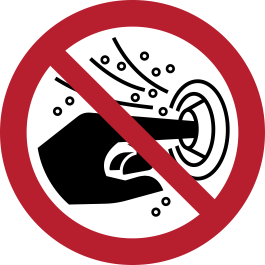
Reaching into the marked opening or equipment is prohibited.

Understanding this sign
Red circular signs with a diagonal bar identify an action that must not be taken in the marked area.
Check what object or action the symbol prohibits. A prohibition sign does not identify all the hazards in an area.
What P015 Means
ISO 7010 P015 prohibits putting hands into openings. The pictogram shows a hand entering a slot, struck through with the red prohibition circle and bar. Its target is the classic drawing-in and crushing scenario: an aperture in a machine, enclosure, or piece of equipment behind which rollers, blades, gears, augers, or moving parts operate. Anyone who sees the sign is being told that the opening in front of them is not a safe place for fingers or hands, even briefly.
Typical carriers of P015 include feed openings on shredders and granulators, infeed slots on conveyors and roller systems, paper-handling machinery, packaging lines, letterbox-style chutes, and inspection apertures that must stay open for the process to work. Because the hazard sits behind an opening that invites intervention — a jam to clear, a product to nudge — the sign addresses exactly the moment when a worker is tempted to reach in.
Signage Is Not a Substitute for Guarding
Under the risk-reduction hierarchy of ISO 12100, machinery hazards must first be designed out or guarded; warnings and prohibition markings come last, as a supplementary measure. If a person can reach a dangerous moving part through an opening during normal operation, the primary fix is a fixed guard, an interlocked cover, or an opening dimensioned so limbs cannot reach the danger zone — EN ISO 13857 gives the safety-distance and aperture-size rules for exactly this problem.
P015 therefore belongs on openings that must remain accessible for the process but where residual risk cannot be fully engineered away, such as feed throats that need to accept material of varying size. It is also common on machines where guards exist but can be defeated, reminding operators that clearing blockages by hand is forbidden and that jams require the machine to be stopped and isolated first.
P015 on Product Labels and Machinery
P015 appears at least as often as an on-product label as it does on a wall. Machine builders apply it directly next to hazardous apertures and reproduce it in instruction manuals prepared under ISO 20607 or similar documentation practices, and North American manufacturers often integrate the same pictogram into an ANSI Z535.4 product safety label with a signal word panel and explanatory text such as 'Moving parts inside. Do not reach into opening.'
Placement matters more for this sign than for many prohibitions because the decision to reach in happens at the opening itself, in a second or two. Put the label immediately adjacent to the aperture, oriented toward the operator position, at a size legible from arm's length. A P015 sign across the room does little; one at the feed slot interrupts the reflex.
Related Signs and Common Confusions
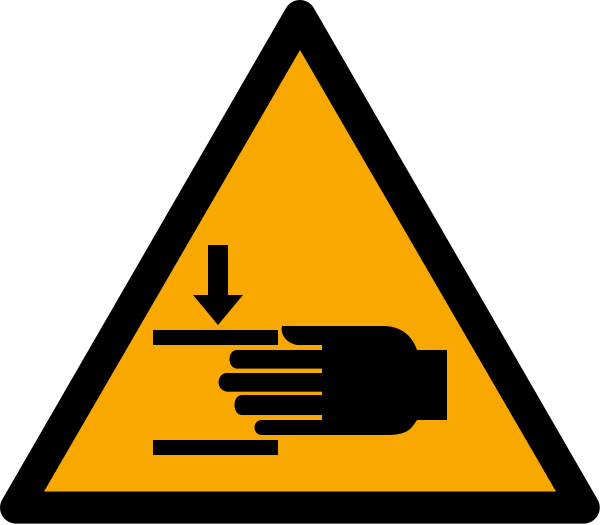
P015 prohibits an action; it does not describe the hazard. Where you want to communicate what happens inside the opening, pair it with a warning sign such as W024 (crushing of hands) or a drawing-in warning, so the viewer understands both the rule and the consequence. On machines where the correct control is procedural, P015 works alongside lockout instructions: stop, isolate, then clear the jam.
Do not use P015 as a stand-in for 'no unauthorized operation' or 'do not touch' in a general sense — its register entry is specific to hands entering openings. For hot surfaces, electrical enclosures, or touch hazards without an aperture, other signs from the ISO 7010 catalogue carry the correct meaning, and misusing P015 dilutes its message on the machines where it genuinely matters.
Where you will see P015
Feed openings on shredders and granulators, infeed slots on conveyors and roller systems, paper-handling machinery, packaging lines, letterbox-style chutes, and inspection apertures that must stay open for the process are the typical carriers. Machine builders apply the label immediately adjacent to the hazardous aperture, oriented toward the operator position and legible from arm's length, and reproduce it in instruction manuals and ANSI Z535.4 product safety labels.
Common questions about P015
What does the hand-in-slot prohibition symbol mean?
It is ISO 7010 P015, 'No reaching in.' It prohibits putting hands into the opening it is placed next to, because moving parts, crushing points, or other hazards sit behind that aperture. It is common on shredders, conveyors, packaging machines, and any equipment with a feed slot or inspection opening.
Can I just put a P015 sign on a machine instead of a guard?
No. Machinery safety standards, led by ISO 12100, require hazards to be eliminated or guarded first; signs are only a supplementary measure for residual risk. If a hand can reach a dangerous moving part through an opening, the opening needs a guard or dimensions that prevent access per EN ISO 13857 — the sign then reinforces, not replaces, that protection.
Where should a no-reaching-in label be positioned on equipment?
Directly at the hazardous opening, facing the operator, and legible from normal working distance. The behavior it targets — reaching in to clear a jam or adjust product — is decided at the aperture itself, so a label anywhere else on the machine or on a nearby wall is far less effective.
What is the difference between P015 and a crushing-hazard warning sign?
P015 is a prohibition: it tells you not to perform the action of reaching into the opening. A warning sign such as W024 (crushing of hands) is a hazard alert: it tells you what danger exists. They complement each other, and machine builders frequently place both next to a hazardous aperture or combine them on one ANSI Z535.4 label.
Reference details
| Symbol code | P015 |
|---|---|
| Sign family | ISO Prohibition Signs |
| Standard reference | ISO 7010:2019 / ISO 3864-1 ISO Online Browsing Platform: P015 |
| Screen color reference | #FF0000. Screen colors are not a production color specification. |
| Download formats | SVG reference artwork; a 1024 × 1024 pixel PNG conversion on a white canvas. |
| Record date | · How to interpret our dates |
| Page updated |
Choosing a physical sign size
Download dimensions are not installation dimensions. Select sign size, material, placement, and lighting using the applicable standard and the actual viewing conditions. Chemical label sizing follows its own rules. Read the artwork and sizing guide.
Sources and artwork credits
- Artwork source
- Wikimedia Commons file page
- Creator credited by source
- ISO
- License
- Public domain
- Source metadata checked
SVG files are local reference copies. PNG files are raster conversions. Check the linked file history and license terms before reuse; a source-metadata check is not certification of the artwork or a workplace installation.
Report a correction to this reference